Connecting an RS485 converter to an ESP32
This page was translated automatically from Italian. Read the original
Many home systems use RS485: radiant floor heating, photovoltaic inverters, heat meters, heat pumps. An ESP32 has three serial ports, but it operates at 3.3 V with signals referenced to ground; the bus, however, uses a differential pair of wires. In between, a converter costing only a few euros is required. This guide explains how we connected it in two real-world cases, on a relay board and on a wall touch panel, to make them communicate with the bus of a Radiax radiant floor system. The mistakes we made are the most common ones, and you will find them here in advance.
RS485 in brief
On an RS485 bus, data travels over two wires, A and B: the voltage difference between the two matters, not the voltage relative to ground. This is why it can handle dozens of meters of cable and the interference from an electrical panel. It is almost always half duplex: one speaks at a time, while the others listen. At both ends of the cable, there are terminations, 120 Ω resistors between A and B, and somewhere there are the fail-safe resistors (biasing resistors), which keep the line in a defined state when no one is speaking.
The TTL-RS485 converter does two things: it translates the TX and RX of the ESP32 serial port into the differential signal, and it decides when to occupy the line to transmit.
Which converter
At 3.3 V. The ESP32 pins cannot handle 5 V. Many modules accept a power supply between 3.3 and 5 V: power them at 3.3 V, so that the signals they send to the ESP32 also remain at 3.3 V.
With automatic direction, if possible. A module like the XY-485 switches to transmission automatically when it sees the TX line go low: no extra pin and no timing to manage in the firmware. Modules with a bare MAX485, on the other hand, have the DE/RE pin, which must be connected to a GPIO and set high before transmitting and low immediately after the last bit. They work well, but they are an extra opportunity to make a mistake.
There is one limit to be aware of. Many automatic direction converters only drive the line for zeros and leave the ones to the biasing resistors. On a long bus, with other boards attached, sometimes this is not enough: if others hear you poorly, it is one of the suspects.
Which ESP32 pins
UART0 is the one used for the USB port and firmware uploading: leave it alone. For the bus, use UART2, which on DevKits is usually on pins 16 (RX) and 17 (TX). On the AZ-Touch MOD panel, they are free, and those are the ones we used.
It is not a requirement: the ESP32 can bring a serial port to almost any pin. On the Devantech ESP32LR88 relay board, the only two pins of the module that the board leaves free are 35 and 32, and there we used GPIO35 to receive and GPIO32 to transmit. Pin 35 is an input-only pin, perfect for RX. Some rules for choosing:
- Avoid boot pins (0, 2, 5, 12, 15) and those for the flash memory (from 6 to 11).
- On WROVER modules, 16 and 17 are used for extra memory: choose another free pair, for example 25 and 26.
- Do not go through the board’s inputs. The terminal inputs of many relay boards have a filter (on the ESP32LR88, 10 kΩ and 100 nF: about one millisecond). At 9600 baud, a bit lasts a tenth of a millisecond, and the filter eats it. The converter must be connected directly to the module pins, even if it means soldering.
In the code, you just need to say which pins to use. With Arduino:
HardwareSerial bus(2);  // UART2

void setup() {
  Serial.begin(115200);
  bus.begin(9600, SERIAL_8N1, 16 /* RX */, 17 /* TX */);
}

void loop() {
  // listen only: print in hexadecimal what passes on the bus
  while (bus.available()) Serial.printf("%02x ", bus.read());
}
With ESPHome, it is a uart: block with rx_pin, tx_pin and baud_rate. The speed and format (here 9600 8N1) are those of your bus: if you do not know them, they must first be found by listening.

TXD and RXD: where mistakes are made
On converters, the labels TXD and RXD do not mean the same thing for all manufacturers. On some, they refer to the name of the ESP32 pin they connect to, so they are not crossed: on the XY-485, TXD goes to the ESP32 TX and RXD to its RX. On others, they must be crossed like any two serial ports. The diagram printed on the back of the module, if present, will tell you; otherwise, testing will decide.
For the first test, there is a trick: a 1 kΩ resistor in series on the ESP32 TX wire. If the direction is wrong, two outputs will face each other, and with the resistor in between, nothing will be broken. Once the listening works, remove it or short-circuit it with a drop of solder. On the XY-485, that wire already has its own LED and its own resistance to the positive: with 1 kΩ in series, the zero reaches the converter at a few tenths of a volt, and the circuit that puts it into transmission may not trigger at all.
Even the colors of the included cable are not reliable: on ours, black was positive and yellow was ground. Follow every wire to the label next to the connector.
Ground, earth, and terminations
A common reference is needed. A and B alone are sufficient only if the converter and the bus already share the same ground, for example when the ESP32 is powered by the bus itself. If it has its own power supply, connect the bus negative to the converter ground.
The third terminal is not always a GND. On the XY-485, on the bus side, it says 接大地, which means “to earth”: it is the return for the surge protection. Using a tester, with the converter disconnected, check if it has continuity with the GND on the ESP32 side. If it does not, the bus negative must go to the GND.
One termination too many. Measure the resistance between A and B of the disconnected converter: approximately 120 Ω means it has the onboard termination. An existing bus is already terminated, and an extra resistor will load it.
Every extra converter adds weight. It actually happened to us: a USB-RS485 dongle, left on the terminals after a PC listening session, caused the furthest probe in the system to disappear for three weeks. Once the dongle was unplugged, the probe started responding again on its own. Only what is necessary should remain on the bus.
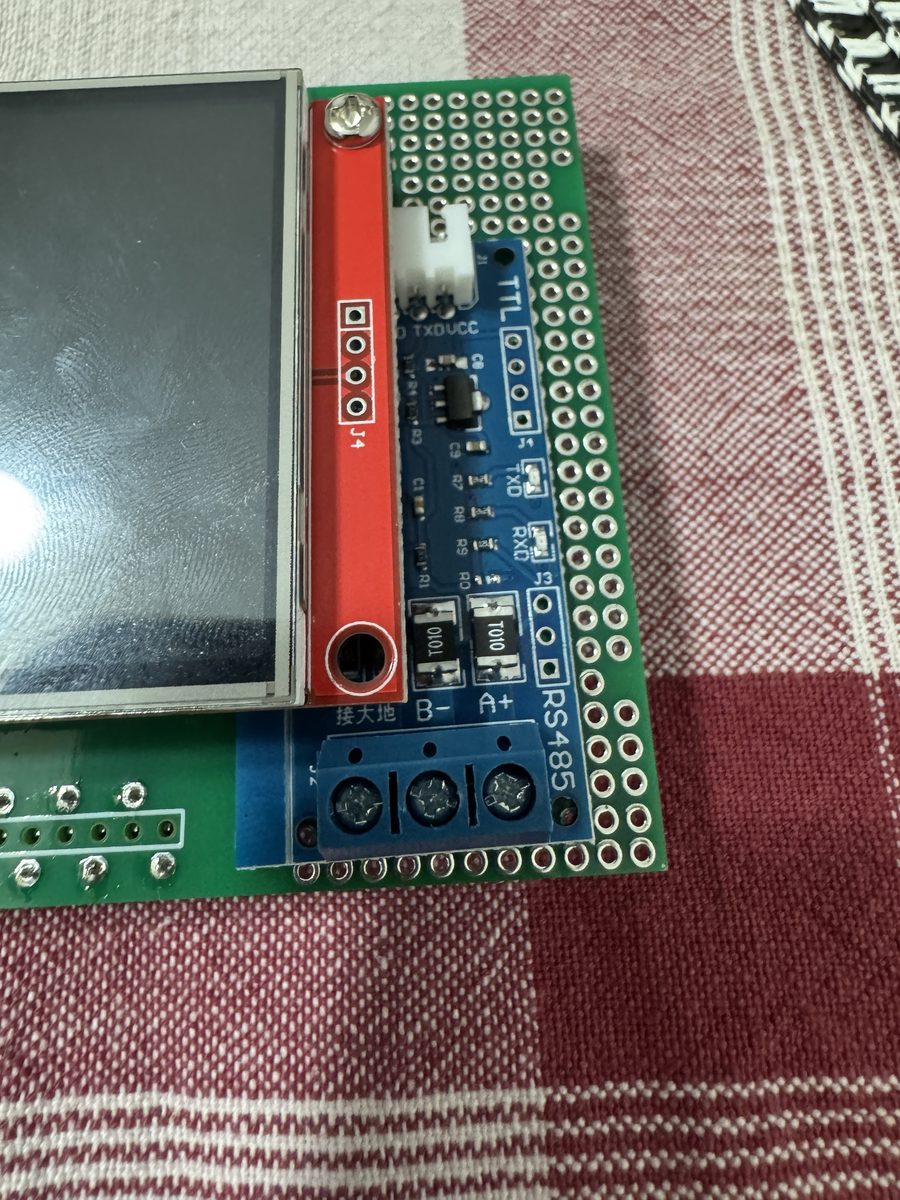
The bus connection point matters
In theory, a bus is the same wire everywhere. In practice, it is not. With the relay board connected at a certain point on the cable, the ESP32 could perfectly hear who was querying the bus, but its responses were not arriving: the other device was repeating a request twice. By moving the wires to the bus terminal block on the manifold board, all tests succeeded. The touch panel, however, works from the location of the old wall display, on its own cable.
The rule we have learned: if you can hear but cannot be heard, before changing firmware or the converter, try changing the connection point.
The tests, in order
- With the power switched off, using a tester. No continuity between 3.3 V and ground, nor between RX and TX. If you have soldered onto a module, check the nearby pads: on the ESP32LR88, the one next to TX controls relay 1, and one extra drop of solder would connect the serial port to the relay.
- Listening only. The firmware transmits nothing. On a talking bus, sensible messages must appear; if nothing appears, swap the two data wires, then A and B. This test cannot disturb the system.
- Only afterwards, transmit, and only if you know what you are responding with. Two devices with the same address will mask each other: if your ESP32 takes the place of a device, the original must be disconnected from the bus.
A useful detail: using the ESP32’s internal resistors, you can tell if the converter is present. Pull the RX pin first towards ground and then towards positive: if the reading follows the resistor, there is no one on the wire; if it stays still, the converter is driving it. On pins 34 to 39, which do not have internal resistors, an external resistor is needed, for example 100 kΩ towards ground.
What has been tested
- AZ-Touch MOD panel with XY-485 on pins 16 and 17, powered by the bus: has been displaying a real Radiax system since October 10, 2026.
- ESP32LR88 relay board with the converter soldered on pins 35 and 32: has been working on the bus since October 8, 2026, connected to the manifold board terminal block.
- Not tested: converters with a DE/RE pin and the sixteen-relay board, for which only the schematic exists.

The drawings and firmware are in the ORFHAn repository. How the bus we used for testing is built, and who commands it, is explained by rehumatism.